

Go to Windows platform Display platforms icon
Go to Windows platform Go to Mac platform Go to Android platform Go to iOS platform
webOS Dev Manager icon

webOS Dev Manager

1.99.20
5 4 reviews
57.3 k downloads
security security

Manage root or developer mode on your LG TV with webOS

Advertisement
Remove ads and more with Turbo
Advertisement
Remove ads and more with Turbo
Alberto García icon
Reviewed by
Alberto García
Developer’s Operations and Support
Alberto García is part of Uptodown's in-house Editorial Team. Translated by Uptodown Localization Team

webOS Dev Manager is an app that allows you to access your LG webOS TV from your PC. Through this app, you can install packages in developer mode, as well as use it as a file explorer to access the internal memory of your Smart TV. To use this feature, you will need to create an LG developer account and activate this mode on your TV. It is important to know that developer accounts are limited to 1000 hours. After this time, you must activate it again to use this mode.

Connect to your Smart TV via SSH or your preferred method

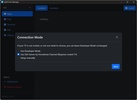
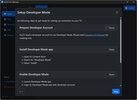
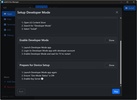
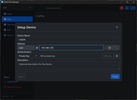
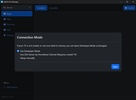
Go to the add device section to pair a TV with webOS Dev Manager. There are three pairing methods: using the developer mode, connecting via SSH through Homebrew Channel (requires the TV to be rooted), or configuring it manually. If you connect via SSH, the default password is "alpine".

Advertisement
Remove ads and more with Turbo

Install and uninstall apps, browse files, and use the terminal

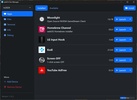
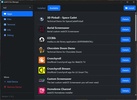
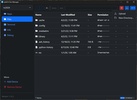
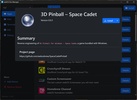
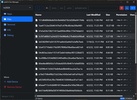
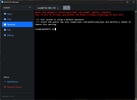
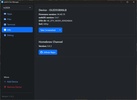
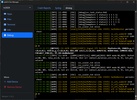
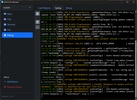
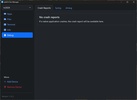
After successfully configuring your TV and connecting to it, you can see the apps you have installed, as well as install others. If the app you want to install does not appear in the list, you can also add it if you have the file on your PC. You can also uninstall the ones you already have installed. In the bottom right corner, you can see how much free space you have on your device. From the file explorer, you can modify files stored in the memory. This can help you free up space or make any modifications. You can also execute commands from the terminal.

Apps that are not available in the webOS Store

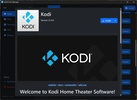
One of the main advantages of webOS Dev Manager is the ability to install apps that are not available in the webOS store. Among these is Moonlight, which allows you to stream your PC screen for gaming and viewing content. You could also add a modified version of YouTube or the famous media player Kodi.

Download webOS Dev Manager and comfortably manage your Smart TV from your PC.

Information about webOS Dev Manager 1.99.20

Basic information

Developer webOS Brew
Category IDE
Rating All ages
Languages English

Distribution model

Pricing Free
License Apache 2.0
Source code
Copyright © 2026 webOS Brew
Why is this app published on Uptodown? (More information)

Security and privacy

Required permissions Not applicable
See security and antivirus report

Download info

Downloads 57,331
Date Sep 6, 2026
File type MSI
Size 13.39 MB
SHA256 1b4de388a1c6eb03c902bb6d36bdcd717b4737660326ed1876c97fa8148049b7
Advertisement
Remove ads and more with Turbo

Older versions

msi 1.99.19 Aug 14, 2026
msi 1.99.16 Dec 10, 2025
msi 1.99.5 Apr 17, 2025
msi 1.13.3 Jun 11, 2024
msi 1.12.0 Oct 31, 2023

Rate this App

Review the app
webOS Dev Manager icon

Rating

5.0
5
4
3
2
1
4 reviews

Comments

There are no opinions about webOS Dev Manager yet. Be the first! Comment

Advertisement
Remove ads and more with Turbo
PkgEditor icon
Edit PS4 files in PKG, SFO or PFS format
Visual Studio Code icon
Microsoft's cross-platform code editor
Visual C++ Redistributable Runtime All-in-One icon
Install the latest version of Visual C++ Redistributable
Dev-C++ icon
Development environment for C and C++
Microsoft .NET Desktop Runtime icon
Run apps built with .NET on Windows
Arduino IDE icon
The official app for Arduino programming
cc-switch icon
Manage multiple AI models from one place
OpenHashTab icon
Generate and verify hash values
Codex icon
OpenAI's official companion for programming with ChatGPT
Proton VPN icon
Powerful, free, secure and unlimited VPN
Rufus icon
Create boot disks from an external drive
Telegram Desktop icon
Talk to all your Telegram contacts from the desktop
VLC Media Player icon
A powerful media player and streaming server
LightCraft icon
A digital library for all your photos
FilmCraft icon
Professional video editing that's accessible to everyone
PhotoCraft icon
An image editor you already know how to use
M.U.G.E.N icon
The basis to create your own fighting games
PkgEditor icon
Edit PS4 files in PKG, SFO or PFS format
Android Studio icon
The best environment for developing Android apps
Visual Studio Code icon
Microsoft's cross-platform code editor
Postman icon
A comprehensive platform for API development, testing and management
Aseprite icon
Create pixel art animations
Visual C++ Redistributable Runtime All-in-One icon
Install the latest version of Visual C++ Redistributable
RPG Maker icon
The creation of whole fanatasy worlds is in your hands